1
2
3
4
5
6
7
8
9
10
11
12
13
14
15
16
17
18
19
20
21
22
23
24
25
26
27
28
29
30
31
32
33
34
35
36
37
38
39
40
41
42
43
44
45
46
47
48
49
50
51
52
53
54
55
56
57
58
59
60
61
62
63
64
65
66
67
68
69
70
71
72
73
74
75
76
77
78
79
80
81
82
83
84
85
86
87
88
89
90
91
92
93
94
95
96
97
98
99
100
101
102
103
104
105
106
107
108
109
110
111
112
113
|
# image-template
# Purpose
This repository is meant to be a template for building your own custom Universal Blue image. This template is the recommended way to make customizations to any image published by the Universal Blue Project:
- [Aurora](https://getaurora.dev/)
- [Bazzite](https://bazzite.gg/)
- [Bluefin](https://projectbluefin.io/)
- [uCore](https://projectucore.io/)
- [main](https://github.com/ublue-os/main/)
- [hwe](https://github.com/ublue-os/hwe/)
or any other base image if you want to start from scratch:
- Fedora: `quay.io/fedora/fedora-bootc:41`
- CentOS Stream 9: `quay.io/centos-bootc/centos-bootc:stream9`
- CentOS Stream 10 (in development): `quay.io/centos-bootc/centos-bootc:stream10`
This template includes a Containerfile and a Github workflow for building the container image, signing, and proper metadata to be listed on [artifacthub](https://artifacthub.io/). As soon as the workflow is enabled in your repository, it will build the container image and push it to the Github Container Registry.
# Prerequisites
Working knowledge in the following topics:
- Containers
- https://www.youtube.com/watch?v=SnSH8Ht3MIc
- https://www.mankier.com/5/Containerfile
- bootc
- https://bootc-dev.github.io/bootc/
- Fedora Silverblue (and other Fedora Atomic variants)
- https://docs.fedoraproject.org/en-US/fedora-silverblue/
- Github Workflows
- https://docs.github.com/en/actions/using-workflows
# How to Use
## Template
Select `Use this Template` and create a new repository from it. To enable the workflows, you may need to go the `Actions` tab of the new repository and click to enable workflows.
## Containerfile
This file defines the operations used to customize the selected image. It contains examples of possible modifications, including how to:
- change the upstream from which the custom image is derived
- add additional RPM packages
- add binaries as a layer from other images
## Building an ISO
Modify `iso.toml` to point to your custom image before generating an ISO.
- (Steps in progress)
## Workflows
### build.yml
This workflow creates your custom OCI image and publishes it to the Github Container Registry (GHCR). By default, the image name will match the Github repository name.
#### Container Signing
Container signing is important for end-user security and is enabled on all Universal Blue images. It is recommended you set this up, and by default the image builds *will fail* if you don't.
This provides users a method of verifying the image.
1. Install the [cosign CLI tool](https://edu.chainguard.dev/open-source/sigstore/cosign/how-to-install-cosign/#installing-cosign-with-the-cosign-binary)
2. Run inside your repo folder:
```bash
cosign generate-key-pair
```
- Do NOT put in a password when it asks you to, just press enter. The signing key will be used in GitHub Actions and will not work if it is encrypted.
> [!WARNING]
> Be careful to *never* accidentally commit `cosign.key` into your git repo.
3. Add the private key to GitHub
- This can also be done manually. Go to your repository settings, under Secrets and Variables -> Actions
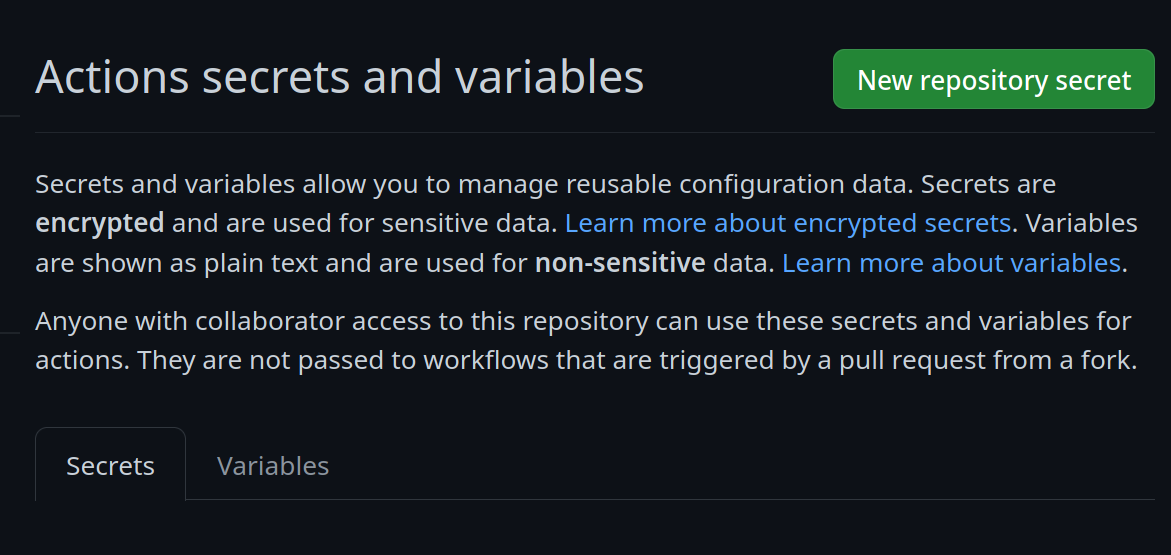
Add a new secret and name it `SIGNING_SECRET`, then paste the contents of `cosign.key` into the secret and save it. Make sure it's the .key file and not the .pub file. Once done, it should look like this:

- (CLI instructions) If you have the `github-cli` installed, run:
```bash
gh secret set SIGNING_SECRET < cosign.key
```
4. Commit the `cosign.pub` file to the root of your git repository.
# Community
- [**bootc discussion forums**](https://github.com/bootc-dev/bootc/discussions) - Nothing in this template is ublue specific, the upstream bootc project has a discussions forum where custom image builders can hang out and ask questions.
## Artifacthub
This template comes with the necessary tooling to index your image on [artifacthub.io](https://artifacthub.io), use the `artifacthub-repo.yml` file at the root to verify yourself as the publisher. This is important to you for a few reasons:
- The value of artifacthub is it's one place for people to index their custom images, and since we depend on each other to learn, it helps grow the community.
- You get to see your pet project listed with the other cool projects in Cloud Native.
- Since the site puts your README front and center, it's a good way to learn how to write a good README, learn some marketing, finding your audience, etc.
[Discussion thread](https://universal-blue.discourse.group/t/listing-your-custom-image-on-artifacthub/6446)
## Community Examples
- [m2os](https://github.com/m2giles/m2os)
- [bos](https://github.com/bsherman/bos)
- [homer](https://github.com/bketelsen/homer/)
|
