
diff options
| author | tranch <tranch.xiao@gmail.com> | 2026-07-09 16:53:52 +0800 |
|---|---|---|
| committer | tranch <tranch.xiao@gmail.com> | 2026-07-09 17:01:14 +0800 |
| commit | 609cd9736f2b0f1f1db01c7fab699197a20f78f9 (patch) | |
| tree | 206f40fb94055c71e2d361ba68920a2aa9aab6de | |
| parent | f9a9e4f843a4f70b421af42964ff5254c0c44e0f (diff) | |
| download | AeroCore-OS-609cd9736f2b0f1f1db01c7fab699197a20f78f9.tar.gz AeroCore-OS-609cd9736f2b0f1f1db01c7fab699197a20f78f9.zip | |
Configure AeroCore image mirrors
Add build-time mirror configuration for Flatpak and Homebrew, expose the related build args, and install an AeroCore-owned profile script to load mirror environment files. Rename the mirror configuration files from the Bazzite-prefixed names to AeroCore-prefixed names while keeping the upstream Bazzite helper reference intact.
Verification: bash -n system_files/etc/profile.d/aerocore-mirrors.sh && bash -n build_files/build.sh
| -rw-r--r-- | .github/workflows/build.yml | 6 | ||||
| -rw-r--r-- | Containerfile | 19 | ||||
| -rw-r--r-- | Justfile | 10 | ||||
| -rw-r--r-- | README.md | 303 | ||||
| -rwxr-xr-x | build_files/build.sh | 37 | ||||
| -rw-r--r-- | image-template.env | 17 | ||||
| -rw-r--r-- | system_files/etc/profile.d/aerocore-mirrors.sh | 28 |
7 files changed, 105 insertions, 315 deletions
diff --git a/.github/workflows/build.yml b/.github/workflows/build.yml index de2882d..90371c8 100644 --- a/.github/workflows/build.yml +++ b/.github/workflows/build.yml @@ -69,6 +69,11 @@ jobs: # This actually builds the container image - name: Build Image id: build-image + env: + BASE_IMAGE: ${{ vars.BASE_IMAGE || 'ghcr.io/ublue-os/bazzite-deck:stable' }} + FLATPAK_REMOTE_URL: ${{ vars.FLATPAK_REMOTE_URL }} + HOMEBREW_BOTTLE_DOMAIN: ${{ vars.HOMEBREW_BOTTLE_DOMAIN }} + HOMEBREW_API_DOMAIN: ${{ vars.HOMEBREW_API_DOMAIN }} run: | sudo -E $(command -v just) build \ ${IMAGE_NAME} \ @@ -158,4 +163,3 @@ jobs: DIGEST: ${{ steps.push-image.outputs.digest }} run: | cosign sign -y --key env://COSIGN_PRIVATE_KEY ${IMAGE_REGISTRY}/${IMAGE_NAME}@${DIGEST} - diff --git a/Containerfile b/Containerfile index 6db705a..976da0c 100644 --- a/Containerfile +++ b/Containerfile @@ -1,19 +1,16 @@ # Allow build scripts to be referenced without being copied into the final image +ARG BASE_IMAGE="ghcr.io/ublue-os/bazzite-deck:stable" + FROM scratch AS ctx COPY build_files / COPY system_files /system_files # Base Image -FROM ghcr.io/ublue-os/bazzite:stable@sha256:b923f92d5a5b59eb992e269383eba2744601052da9d3d1595f76e79aa6ce2df0 +FROM ${BASE_IMAGE} ## Other possible base images include: -# FROM ghcr.io/ublue-os/bazzite:testing -# FROM ghcr.io/ublue-os/aurora:stable -# FROM ghcr.io/ublue-os/bluefin-nvidia-open:stable -# -# ... and so on, here are more base images -# Universal Blue Images: https://github.com/orgs/ublue-os/packages -# Fedora base image: quay.io/fedora/fedora-bootc:44 -# CentOS base images: quay.io/centos-bootc/centos-bootc:stream10 +# ghcr.io/ublue-os/bazzite-deck:testing +# ghcr.io/ublue-os/bazzite-deck:stable-43.20260420 +# ghcr.io/ublue-os/bazzite:stable ### [IM]MUTABLE /opt ## Some bootable images, like Fedora, have /opt symlinked to /var/opt, in order to @@ -30,6 +27,10 @@ FROM ghcr.io/ublue-os/bazzite:stable@sha256:b923f92d5a5b59eb992e269383eba2744601 ## make modifications desired in your image and install packages by modifying the build.sh script ## the following RUN directive does all the things required to run "build.sh" as recommended. +ARG FLATPAK_REMOTE_URL="" +ARG HOMEBREW_BOTTLE_DOMAIN="" +ARG HOMEBREW_API_DOMAIN="" + RUN --mount=type=bind,from=ctx,source=/,target=/ctx \ --mount=type=cache,dst=/var/cache \ --mount=type=cache,dst=/var/log \ @@ -8,6 +8,10 @@ export image_keywords := env_var("IMAGE_KEYWORDS") export image_logo_url := env_var("IMAGE_LOGO_URL") export default_tag := env_var("DEFAULT_TAG") export bib_image := env_var("BIB_IMAGE") +export BASE_IMAGE := env_var_or_default("BASE_IMAGE", "ghcr.io/ublue-os/bazzite-deck:stable") +export FLATPAK_REMOTE_URL := env_var_or_default("FLATPAK_REMOTE_URL", "") +export HOMEBREW_BOTTLE_DOMAIN := env_var_or_default("HOMEBREW_BOTTLE_DOMAIN", "") +export HOMEBREW_API_DOMAIN := env_var_or_default("HOMEBREW_API_DOMAIN", "") alias build-vm := build-qcow2 alias rebuild-vm := rebuild-qcow2 @@ -100,6 +104,12 @@ build $target_image=image_name $tag=default_tag: BUILD_ARGS=() LABELS=() + for arg in BASE_IMAGE FLATPAK_REMOTE_URL HOMEBREW_BOTTLE_DOMAIN HOMEBREW_API_DOMAIN; do + if [[ -n "${!arg:-}" ]]; then + BUILD_ARGS+=("--build-arg" "${arg}=${!arg}") + fi + done + if [[ -z "$(git status -s)" ]]; then GIT_SHA=$(git rev-parse --short HEAD) LABELS+=("--label" "io.artifacthub.package.readme-url=https://raw.githubusercontent.com/{{ repo_organization }}/{{ image_name }}/${GIT_SHA}/README.md") @@ -1,306 +1,37 @@ -# image-template +# AeroCore OS -This repository is meant to be a template for building your own custom [bootc](https://github.com/bootc-dev/bootc) image. This template is the recommended way to make customizations to any image published by the Universal Blue Project. +A customized Bazzite-deck image tailored for living-room HTPCs, featuring China-localized updates and an integrated game accelerator. -# Community +AeroCore OS is built on top of the `ublue-os/image-template` ecosystem. Unlike a heavy fork of `ublue-os/bazzite`, AeroCore OS adopts a **layered architecture** that starts directly from a pre-built upstream Bazzite image: -If you have questions about this template after following the instructions, try the following spaces: -- [Universal Blue Forums](https://universal-blue.discourse.group/) -- [Universal Blue Discord](https://discord.gg/WEu6BdFEtp) -- [bootc discussion forums](https://github.com/bootc-dev/bootc/discussions) - This is not an Universal Blue managed space, but is an excellent resource if you run into issues with building bootc images. +```dockerfile +FROM ghcr.io/ublue-os/bazzite-deck:stable -# How to Use - -To get started on your first bootc image, simply read and follow the steps in the next few headings. -If you prefer instructions in video form, TesterTech created an excellent tutorial, embedded below. - -[](https://www.youtube.com/watch?v=IxBl11Zmq5wE) - -## Step 0: Prerequisites - -These steps assume you have the following: -- A Github Account -- A machine running a bootc image (e.g. Bazzite, Bluefin, Aurora, or Fedora Atomic) -- Experience installing and using CLI programs - -## Step 1: Preparing the Template - -### Step 1a: Copying the Template - -Select `Use this Template` on this page. You can set the name and description of your repository to whatever you would like, but all other settings should be left untouched. - -Once you have finished copying the template, you need to enable the Github Actions workflows for your new repository. -To enable the workflows, go to the `Actions` tab of the new repository and click the button to enable workflows. - -### Step 1b: Cloning the New Repository - -Here I will defer to the much superior GitHub documentation on the matter. You can use whichever method is easiest. -[GitHub Documentation](https://docs.github.com/en/repositories/creating-and-managing-repositories/cloning-a-repository) - -Once you have the repository on your local drive, proceed to the next step. - -## Step 2: Initial Setup - -### Step 2a: Creating a Cosign Key - -Container signing is important for end-user security and is enabled on all Universal Blue images. By default the image builds *will fail* if you don't. - -First, install the [cosign CLI tool](https://edu.chainguard.dev/open-source/sigstore/cosign/how-to-install-cosign/#installing-cosign-with-the-cosign-binary) -With the cosign tool installed, run inside your repo folder: - -```bash -COSIGN_PASSWORD="" cosign generate-key-pair -``` - -The signing key will be used in GitHub Actions and will not work if it is password protected. - -> [!WARNING] -> Be careful to *never* accidentally commit `cosign.key` into your git repo. If this key goes out to the public, the security of your repository is compromised. - -Next, you need to add the key to GitHub. This makes use of GitHub's secret signing system. - -<details> - <summary>Using the Github Web Interface (preferred)</summary> - -Go to your repository settings, under `Secrets and Variables` -> `Actions` -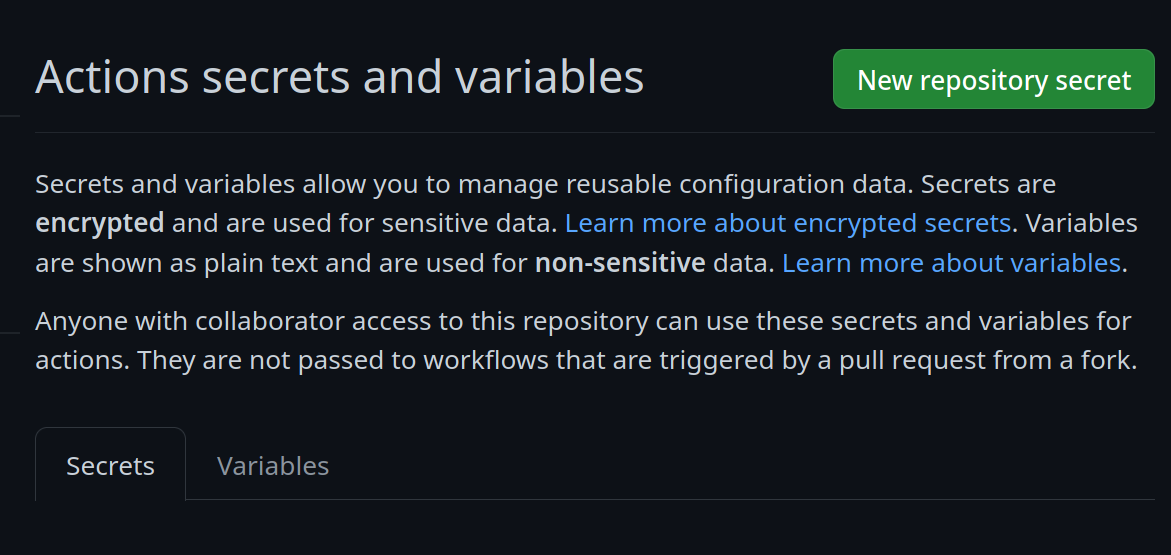 -Add a new secret and name it `SIGNING_SECRET`, then paste the contents of `cosign.key` into the secret and save it. Make sure it's the .key file and not the .pub file. Once done, it should look like this: -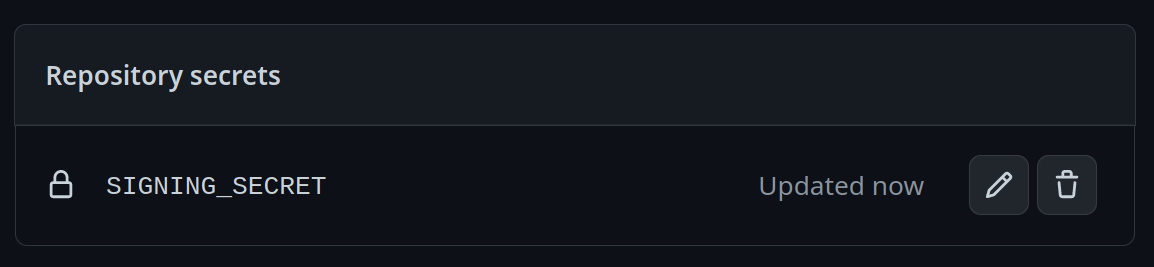 -</details> -<details> -<summary>Using the Github CLI</summary> - -If you have the `github-cli` installed, run: - -```bash -gh secret set SIGNING_SECRET < cosign.key -``` -</details> - -### Step 2b: Choosing Your Base Image - -To choose a base image, simply modify the line in the container file starting with `FROM`. This will be the image your image derives from, and is your starting point for modifications. -For a base image, you can choose any of the Universal Blue images or start from a Fedora Atomic system. Below this paragraph is a dropdown with a non-exhaustive list of potential base images. - -<details> - <summary>Base Images</summary> - -- Bazzite: `ghcr.io/ublue-os/bazzite:stable` -- Aurora: `ghcr.io/ublue-os/aurora:stable` -- Bluefin: `ghcr.io/ublue-os/bluefin:stable` -- Universal Blue Base: `ghcr.io/ublue-os/base-main:latest` -- Fedora: `quay.io/fedora/fedora-bootc:44` - -You can find more Universal Blue images on the [packages page](https://github.com/orgs/ublue-os/packages). -</details> - -If you don't know which image to pick, choosing the one your system is currently on is the best bet for a smooth transition. To find out what image your system currently uses, run the following command: -```bash -sudo bootc status -``` -This will show you all the info you need to know about your current image. The image you are currently on is displayed after `Booted image:`. Paste that information after the `FROM` statement in the Containerfile to set it as your base image. - -### Step 2c: Changing Names - -Change the `IMAGE_NAME` and `REPO_ORGANIZATION` variable inside the `image-template.env` - -To commit and push all the files changed and added in step 2 into your Github repository: -```bash -git add Containerfile image-template.env cosign.pub -git commit -m "Initial Setup" -git push -``` -Once pushed, go look at the Actions tab on your Github repository's page. The green checkmark should be showing on the top commit, which means your new image is ready! - -## Step 3: Switch to Your Image - -From your bootc system, run the following command substituting in your Github username and image name where noted. -```bash -sudo bootc switch ghcr.io/<username>/<image_name> -``` -This should queue your image for the next reboot, which you can do immediately after the command finishes. You have officially set up your custom image! See the following section for an explanation of the important parts of the template for customization. - -# Repository Contents - -## Containerfile - -The [Containerfile](./Containerfile) defines the operations used to customize the selected image.This file is the entrypoint for your image build, and works exactly like a regular podman Containerfile. For reference, please see the [Podman Documentation](https://docs.podman.io/en/latest/Introduction.html). - -## build.sh - -The [build.sh](./build_files/build.sh) file is called from your Containerfile. It is the best place to install new packages or make any other customization to your system. There are customization examples contained within it for your perusal. - -## build.yml - -The [build.yml](./.github/workflows/build.yml) Github Actions workflow creates your custom OCI image and publishes it to the Github Container Registry (GHCR). By default, the image name will match the Github repository name. - -# Building Disk Images - -This template provides an out of the box workflow for creating disk images (ISO, qcow, raw) for your custom OCI image which can be used to directly install onto your machines. - -This template provides a way to upload the disk images that is generated from the workflow to a S3 bucket. The disk images will also be available as an artifact from the job, if you wish to use an alternate provider. To upload to S3 we use [rclone](https://rclone.org/) which is able to use [many S3 providers](https://rclone.org/s3/). - -## Setting Up ISO Builds - -The [build-disk.yml](./.github/workflows/build-disk.yml) Github Actions workflow creates a disk image from your OCI image by utilizing the [bootc-image-builder](https://osbuild.org/docs/bootc/). In order to use this workflow you must complete the following steps: - -1. Modify `disk_config/iso.toml` to point to your custom container image before generating an ISO image. -2. If you changed your image name from the default in `build.yml` then in the `build-disk.yml` file edit the `IMAGE_REGISTRY`, `IMAGE_NAME` and `DEFAULT_TAG` environment variables with the correct values. If you did not make changes, skip this step. -3. Finally, if you want to upload your disk images to S3 then you will need to add your S3 configuration to the repository's Action secrets. This can be found by going to your repository settings, under `Secrets and Variables` -> `Actions`. You will need to add the following - - `S3_PROVIDER` - Must match one of the values from the [supported list](https://rclone.org/s3/) - - `S3_BUCKET_NAME` - Your unique bucket name - - `S3_ACCESS_KEY_ID` - It is recommended that you make a separate key just for this workflow - - `S3_SECRET_ACCESS_KEY` - See above. - - `S3_REGION` - The region your bucket lives in. If you do not know then set this value to `auto`. - - `S3_ENDPOINT` - This value will be specific to the bucket as well. - -Once the workflow is done, you'll find the disk images either in your S3 bucket or as part of the summary under `Artifacts` after the workflow is completed. - -# Artifacthub - -This template comes with the necessary tooling to index your image on [artifacthub.io](https://artifacthub.io). Use the `artifacthub-repo.yml` file at the root to verify yourself as the publisher. This is important to you for a few reasons: - -- The value of artifacthub is it's one place for people to index their custom images, and since we depend on each other to learn, it helps grow the community. -- You get to see your pet project listed with the other cool projects in Cloud Native. -- Since the site puts your README front and center, it's a good way to learn how to write a good README, learn some marketing, finding your audience, etc. - -[Discussion Thread](https://universal-blue.discourse.group/t/listing-your-custom-image-on-artifacthub/6446) - -# Justfile Documentation - -The `Justfile` contains various commands and configurations for building and managing container images and virtual machine images using Podman and other utilities. -To use it, you must have installed [just](https://just.systems/man/en/introduction.html) from your package manager or manually. It is available by default on all Universal Blue images. - -## Environment Variables - -These are all sourced from the `image-template.env` file. - -- `image_name`: The name of the image (default: "image-template"). -- `default_tag`: The default tag for the image (default: "latest"). -- `bib_image`: The Bootc Image Builder (BIB) image (default: "quay.io/centos-bootc/bootc-image-builder:latest"). - -## Building The Image - -All these recipes will work (with default values) without supplying any arguments to them, e.g. `just build` - -### `just build` - -Builds a container image using Podman. - -```bash -just build $target_image $tag -``` - -Arguments: -- `$target_image`: The tag you want to apply to the image (default: `$image_name`). -- `$tag`: The tag for the image (default: `$default_tag`). - -### Rechunking -We can flatten the layers of container images to make sure there isn't a single huge layer when your image gets published. -This does not make your image faster to download, just provides better resumability. - -#### `just ostree-rechunk` -Rechunks the existing Image with [rpm-ostree](https://coreos.github.io/rpm-ostree/build-chunked-oci/) - -```bash -just ostree-rechunk $target_image $tag ``` -#### `just rechunk` -Rechunks the existing Image with [chunkah](https://github.com/coreos/chunkah), this is probably gonna be the default here at some point, try it out, it's cool. - -```bash -just rechunk $target_image $tag -``` +By focusing strictly on file overlays and configuration writing, this build intentionally avoids invasive operations like `dnf5 install/remove`, COPR enablement, akmods pulls, or kernel recompilations. This architectural choice keeps AeroCore OS completely immune to Fedora/COPR dependency drift during major upstream transition windows (e.g., Bazzite 43 to 44). -### Switching to the locally built image for testing +--- -The image has to be in the containers-storage owned by root, to be able to rebase to it, see the `_rootful_load_image` recipe. +## Key Features & Optimizations -`sudo just build` and `sudo just ostree-rechunk` builds directly as root and allows you to skip the transfer to the root containers-storage. +* **Couch-Gaming Tailored:** Optimized settings for a seamless, out-of-the-box living-room console experience. +* **China-Localized Mirrors:** Pre-configured environment setups (e.g., `/etc/environment.d/99-aerocore-mirrors.conf`) utilizing low-latency, mainland China-hosted update streams. +* **Integrated Game Accelerator:** Embedded network booster configuration to ensure low-latency connection for Steam and local gaming services. +* **Maintainable Overlay Structure:** Structured `system_files/` directory for robust, long-term AeroCore core file injection without touching upstream packages. -You can rebase to all the images that are in your containers-storage: - -``` -sudo podman image list --filter=label=containers.bootc=1 -``` - -See [man bootc switch](https://bootc.dev/bootc/man/bootc-switch.8.html) for more info. - -``` -sudo bootc switch --transport containers-storage localhost/myimage:latest -``` +## Local Build -and reboot your system! - -## Building and Running Virtual Machines and ISOs - -The below commands all build QCOW2 images. To produce or use a different type of image, substitute in the command with that type in the place of `qcow2`. The available types are `qcow2`, `iso`, and `raw`. - -### `just build-qcow2` - -Builds a QCOW2 virtual machine image. +To build AeroCore OS locally, edit `image-template.env` to match your target configurations and then run: ```bash -just build-qcow2 $target_image $tag -``` - -### `just rebuild-qcow2` +just build -Rebuilds a QCOW2 virtual machine image. - -```bash -just rebuild-vm $target_image $tag ``` -### `just run-vm-qcow2` - -Runs a virtual machine from a QCOW2 image. +To test a different upstream base image directly without modifying the environment files: ```bash -just run-vm-qcow2 $target_image $tag -``` - -### `just spawn-vm` - -Runs a virtual machine using systemd-vmspawn. +BASE_IMAGE=ghcr.io/ublue-os/bazzite-deck:testing just build -```bash -just spawn-vm rebuild="0" type="qcow2" ram="6G" ``` - -## File Management - -### `just check` - -Checks the syntax of all `.just` files and the `Justfile`. - -### `just fix` - -Fixes the syntax of all `.just` files and the `Justfile`. - -### `just clean` - -Cleans the repository by removing build artifacts. - -### `just lint` - -Runs shell check on all Bash scripts. - -### `just format` - -Runs shfmt on all Bash scripts. - -## Additional resources - -For additional driver support, ublue maintains a set of scripts and container images available at [ublue-akmod](https://github.com/ublue-os/akmods). These images include the necessary scripts to install multiple kernel drivers within the container (Nvidia, OpenRazer, Framework...). The documentation provides guidance on how to properly integrate these drivers into your container image. - -## Community Examples - -These are images derived from this template (or similar enough to this template). Reference them when building your image! - -- [m2Giles' OS](https://github.com/m2giles/m2os) -- [bOS](https://github.com/bsherman/bos) -- [Homer](https://github.com/bketelsen/homer/) -- [Amy OS](https://github.com/astrovm/amyos) -- [VeneOS](https://github.com/Venefilyn/veneos) diff --git a/build_files/build.sh b/build_files/build.sh index 0bb290c..f1709da 100755 --- a/build_files/build.sh +++ b/build_files/build.sh @@ -5,23 +5,30 @@ set -ouex pipefail # Copy the contents of system_files/ of the git repo to / cp -avf "/ctx/system_files"/. / -### Install packages +mkdir -p /etc/environment.d -# Packages can be installed from any enabled yum repo on the image. -# RPMfusion repos are available by default in ublue main images -# List of rpmfusion packages can be found here: -# https://mirrors.rpmfusion.org/mirrorlist?path=free/fedora/updates/43/x86_64/repoview/index.html&protocol=https&redirect=1 +if [[ -n "${FLATPAK_REMOTE_URL:-}" || -n "${HOMEBREW_BOTTLE_DOMAIN:-}" || -n "${HOMEBREW_API_DOMAIN:-}" ]]; then + : > /etc/environment.d/99-aerocore-mirrors.conf +fi -# this installs a package from fedora repos -dnf5 install -y tmux +if [[ -n "${FLATPAK_REMOTE_URL:-}" ]]; then + printf '%s\n' "FLATPAK_REMOTE_URL=${FLATPAK_REMOTE_URL}" >> /etc/environment.d/99-aerocore-mirrors.conf + if [[ -f /usr/libexec/bazzite-mirror-utils.sh ]]; then + bash /usr/libexec/bazzite-mirror-utils.sh update_flathub_repo_url "${FLATPAK_REMOTE_URL}" + fi +fi -# Use a COPR Example: -# -# dnf5 -y copr enable ublue-os/staging -# dnf5 -y install package -# Disable COPRs so they don't end up enabled on the final image: -# dnf5 -y copr disable ublue-os/staging +if [[ -n "${HOMEBREW_BOTTLE_DOMAIN:-}" || -n "${HOMEBREW_API_DOMAIN:-}" ]]; then + mkdir -p /etc/skel/.config/environment.d + : > /etc/skel/.config/environment.d/99-aerocore-mirrors.conf +fi -#### Example for enabling a System Unit File +if [[ -n "${HOMEBREW_BOTTLE_DOMAIN:-}" ]]; then + printf '%s\n' "HOMEBREW_BOTTLE_DOMAIN=${HOMEBREW_BOTTLE_DOMAIN}" | tee -a /etc/environment.d/99-aerocore-mirrors.conf /etc/skel/.config/environment.d/99-aerocore-mirrors.conf >/dev/null +fi -systemctl enable podman.socket +if [[ -n "${HOMEBREW_API_DOMAIN:-}" ]]; then + printf '%s\n' "HOMEBREW_API_DOMAIN=${HOMEBREW_API_DOMAIN}" | tee -a /etc/environment.d/99-aerocore-mirrors.conf /etc/skel/.config/environment.d/99-aerocore-mirrors.conf >/dev/null +fi + +find /etc/environment.d /etc/skel/.config/environment.d -name 99-aerocore-mirrors.conf -type f -exec chmod 0644 {} + 2>/dev/null || true diff --git a/image-template.env b/image-template.env index c0707c5..bf848fb 100644 --- a/image-template.env +++ b/image-template.env @@ -1,15 +1,24 @@ # Here we set a bunch of parameters for your image build # output image name, usually same as repo name, change as needed -IMAGE_NAME=image-template +IMAGE_NAME=aerocore-bazzite-image # Make this the same as your github username/organisation -REPO_ORGANIZATION="alice-and-bob" +REPO_ORGANIZATION="AeroCore-IO" -IMAGE_DESC="My Customized Bootc Image" -IMAGE_KEYWORDS="bootc,oci,linux" +IMAGE_DESC="AeroCore customized Bazzite Deck image" +IMAGE_KEYWORDS="bootc,oci,linux,bazzite,steam-deck,aerocore" # Put your own image here for a fancy profile on https://artifacthub.io/! IMAGE_LOGO_URL="https://avatars.githubusercontent.com/u/120078124?s=200&v=4" DEFAULT_TAG="latest" BIB_IMAGE="quay.io/centos-bootc/bootc-image-builder:latest" + +# Keep this on bazzite-deck for Steam Deck, game mode, and handheld customizations. +# Use a concrete tag during transition windows if stable/testing moves underneath you. +BASE_IMAGE="ghcr.io/ublue-os/bazzite-deck:stable" + +# Optional mirror settings. +FLATPAK_REMOTE_URL="" +HOMEBREW_BOTTLE_DOMAIN="" +HOMEBREW_API_DOMAIN="" diff --git a/system_files/etc/profile.d/aerocore-mirrors.sh b/system_files/etc/profile.d/aerocore-mirrors.sh new file mode 100644 index 0000000..e9b93ab --- /dev/null +++ b/system_files/etc/profile.d/aerocore-mirrors.sh @@ -0,0 +1,28 @@ +#!/usr/bin/bash + +[[ -r /usr/libexec/bazzite-mirror-utils.sh ]] && source /usr/libexec/bazzite-mirror-utils.sh + +if ! declare -F is_valid_mirror_url >/dev/null; then + is_valid_mirror_url() { + [[ "$1" =~ ^https?://[^[:space:]]+$ ]] + } +fi + +load_mirror_file() { + local file="$1" + [[ -r "$file" ]] || return + + while IFS='=' read -r key value; do + [[ -z "$key" || "${key:0:1}" == "#" ]] && continue + case "$key" in + FLATPAK_REMOTE_URL|HOMEBREW_BOTTLE_DOMAIN|HOMEBREW_API_DOMAIN) + if is_valid_mirror_url "$value"; then + export "$key"="$value" + fi + ;; + esac +done <"$file" +} + +load_mirror_file /etc/environment.d/99-aerocore-mirrors.conf +load_mirror_file "$HOME/.config/environment.d/99-aerocore-mirrors.conf" |